Plan your tables without printing a single Post-it.
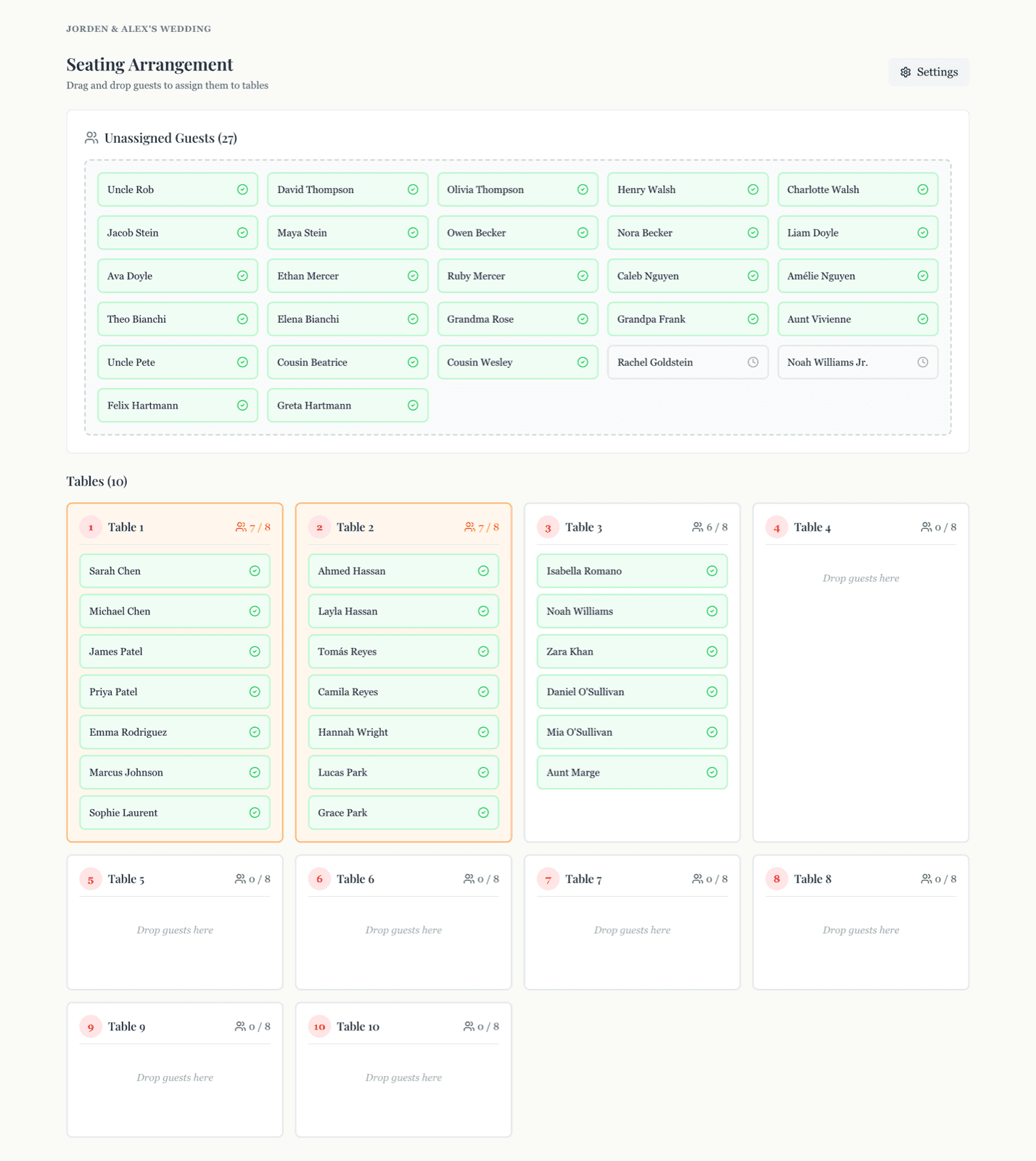
Drag-and-drop guests onto tables. Capacity tracked automatically. Sweetheart table optional. No more dining-room-floor at 1 AM with sticky notes everywhere.
- 7-day free trial
- No credit card required
- $49 one-time
The seating chart always happens at 1 AM
Two weeks before the wedding, the floor of someone's living room is covered in sticky notes. There's a rejected Excel grid. Someone has photocopied a venue diagram. And inevitably, the count is wrong.
Sticky notes on the dining room floor for two hours every night
Excel grids that don't match your guest count after RSVP changes
Plus-ones added late and the seating math doesn't add up
Trying to remember which tables fit 8 versus which fit 10
Re-doing it from scratch every time the venue changes the layout
Printing a final copy and discovering Aunt Marge declined yesterday
Drag, drop, dinner.
Your seating chart, finally on a screen — and connected to your live guest list.
Drag-and-Drop Tables
Pick up a guest card, drop it on a table. That's it. Move people around as the dynamics evolve.
Capacity Tracked Live
Each table shows how many seats are filled and how many remain. Nudges you when a table fills up, nudges harder if you over-pack.
Sweetheart Table Optional
Toggle a sweetheart table on or off in one click. Reserved for the two of you.
Per-Table Capacity
Default 8 per table, but every table can be overridden. Round table for 10 here, intimate 4 there.
Linked To Your Guest List
Seating uses the same guest data as RSVPs and meals. New guest added? They show up unassigned automatically.
Reflows With RSVPs
Someone declines a week before the wedding? Their seat opens up. You move someone in. Done in 10 seconds.
One payment. No subscription.
WedKit is $49 one time. Start with a 7-day free trial, no credit card required. Hosting stays live through 6 months after your wedding date.
- 14-day money-back guarantee
- Everything included
- No hidden fees
Frequently asked.
- How does seating link to my guest list?
- Your seating planner uses the same guest list as RSVPs and meals. When someone confirms, they appear in the unassigned pool. Drag them onto a table and they're seated.
- What if my venue has a specific layout?
- You set the number of tables and per-table capacity. The planner doesn't try to draw your venue — it focuses on the data the caterer and venue staff actually need: who's at which table.
- Can I print or export the seating chart?
- Yes. Export a clean per-table list as CSV or PDF. Send to the venue, the catering captain, or print as place cards.
- What if RSVPs change after I've seated everyone?
- Cancellations open up seats automatically. New plus-ones land in the unassigned pool. You only ever rearrange the changes, not the whole chart.
- Is it included on the free trial?
- Yes. Full seating planner is included in every WedKit account. 7-day free trial, then $49 one-time.
Your seating chart, finally on a screen.
Try WedKit's seating planner free for 7 days. Drag your first guest onto a table in 30 seconds.